
Searching for Clinical Notes
SigmaMD makes it easy to find clinical notes across different parts of the platform. Whether you’re working inside the patient chart or browsing the general Notes list, there are quick ways to get to the information you need. Here’s how:
In the Notes tab
If you’re already viewing a patient’s chart:
- Click the Notes tab.
- Click on the Search bar at the top of the notes list to search by:
- Title
- Content inside the note

In the Notes sidebar
From the top navigation:
- Click the Notes icon in the top right. The sidebar will open with your notes' list.
- Use the Search bar at the top to search across:
- Note title
- Content

When Creating a Referral
At the top of the notes' list, click on the search button to open the search bar.

Filtering Notes
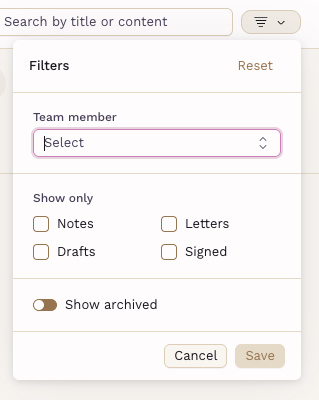
Use the filter icon for a more specific search, select a Team member, or show only the important ones from Notes, Letters, Drafts, or Signed. You can set the visibility for Archived notes as well.
If you’re not seeing expected results, make sure you’re using the correct filters and searching within the right patient or global view.