
Understanding Employer Membership Termination Notifications
When an employer-sponsored membership is scheduled for cancellation, you can automatically notify the affected patients. This helps avoid confusion, supports compliance (including COBRA where applicable), and gives patients time to take the next step.
This setting is available at the employer contract level.
Managing It
- Go to Employers.
- Open the employer.
- In the Contract section, click Edit.
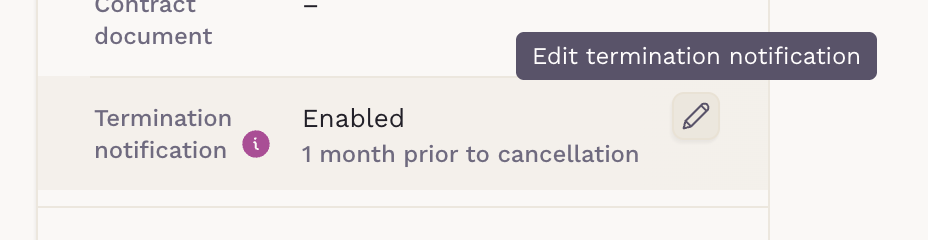
- Locate the Termination notification option.
-
Click on "Edit termination notification" to manage it.
-
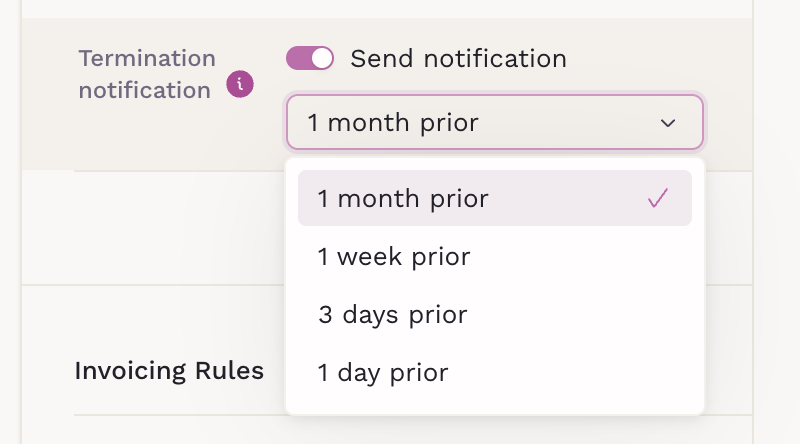
You can enable or disable it and choose when to send it.
How it works
- Notifications are sent only when an employer membership has a scheduled end date.
-
The message is sent to the affected patient(s).
If a dependent is removed from the membership, the primary subscriber is notified.
The email includes:
- The employer name
- The scheduled termination date
- Guidance about continuation options (e.g., COBRA, if applicable)
- Instructions on how to continue care with the practice
Best practices
- Set the notification at least 1 week prior when possible. This gives patients time to respond.
- Review your employer contracts to ensure termination dates are accurate.
Clear communication reduces support requests and helps patients transition smoothly without gaps in care.