
Uncoded Medications
Not everything on your shelf has a drug code — supplements and specialty products often don't. In SigmaMD you can add these as uncoded medications: items identified by a SKU you control instead of a drug code. Once saved, an uncoded medication behaves like any other charge item — it turns up in searches, carries stock and pricing, and moves through the same dispensing workflow.
Adding an Uncoded Medication to Charge Items
- Go to Billing → Charge Items and open the Inventory items tab. Click + Item and choose Medication inventory.
-
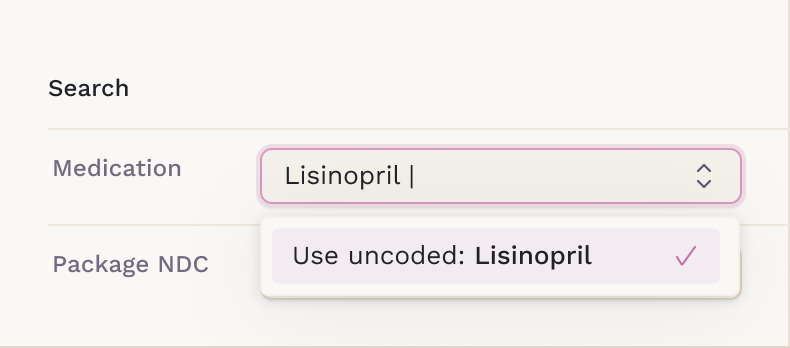
In the Medication field, type the name. When nothing in the drug database matches, the results list offers Use uncoded: followed by what you typed — select it.
- Fill in the rest of the panel and click Save, or Save and add more to keep going.
The item is saved to your practice's database, so the next time anyone searches for it, it comes back as a normal result.
Non-inventory items work the same way from the Non-inventory items tab. The only difference is the Inventory Details section, which doesn't apply and isn't shown.
What Changes on the Form
Choosing the uncoded option reshapes three fields.
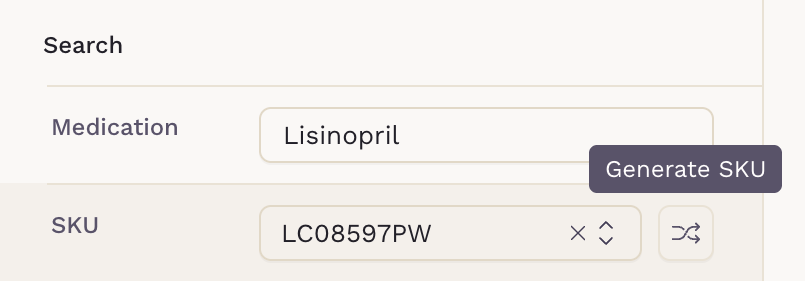
Package NDC disappears and a SKU field takes its place, pre-filled with a code your practice has never used. Strength becomes free text. In the Charge Items table, the Code column shows that SKU where a Medi-Span code would normally sit.

Working With the SKU
The pre-filled code is a starting point, not a commitment. Alongside it you can:
- Pick an existing SKU from the dropdown. It lists only SKUs already tied to uncoded medications, and choosing one pulls in the medication name and the details saved against it.
- Type your own code, if your practice already numbers its stock.
-
Click the shuffle icon to draw a new one.
Dispensing Uncoded Medications
Dispense an uncoded medication exactly as you would any other. On the Dispense Medication screen, Code shows the SKU rather than a Medi-Span code, and Package NDC stays empty — on the medication order and on the printed prescription. Because the item isn't in the drug database, there's no drug monograph to open from its row.
