
How to change a membership cycle length and billing date
A retail membership has two separate settings that people often conflate: how long each cycle lasts, and which day the patient is charged. One can be changed on an active membership, the other cannot.
Changing the billing day
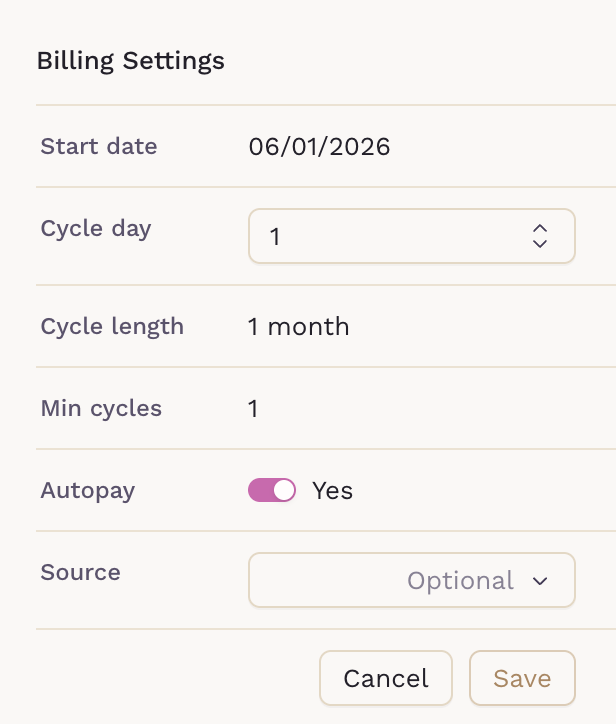
The day a membership renews can be changed while it is active, from the membership on the patient's chart. The change applies going forward:
- The current cycle finishes as scheduled
- The next renewal moves to the new day
- Nothing already invoiced is altered
To change the billing day, open the Manage area of the membership, then go to edit the Blling Settings. In here, you will find the options to change the Cycle day.
Changing the cycle length
The length of the cycle — monthly, quarterly, annual — is part of the membership plan itself and cannot be switched on an active membership. Moving a patient between plans means:
- Confirming the plan with the cycle length you want exists
- Ending the current membership
- Enrolling the patient on the new plan
Because this is a new enrollment, the first cycle can be prorated with Prorate first cycle, which charges only from the start date to the first renewal.
Important considerations
- Changing the billing day does not refund or re-charge the cycle in progress
- Ending a membership to change its cycle length stops its benefits immediately
- Check for a draft invoice before making either change, so the patient is not billed twice
When the goal is only a different charge date, use the billing day change — it avoids the gap that a re-enrollment creates.
Need Help?
If you have any questions or encounter issues, feel free to email us at help@sigmamd.com for assistance.